
Understanding Your Smart Watch’s Charging System
If you are new to wearables, learning how to charge smart watch devices correctly is one of the first things you should master. A smart watch is not like a traditional timepiece — it relies on a small lithium-ion battery that needs regular charging, and the way you charge it directly affects how long that battery lasts. Before you plug anything in, it helps to understand what type of charging hardware your watch uses, because smart watches are not one-size-fits-all when it comes to power. Getting this right from day one sets the tone for how to charge smart watch gear safely and effectively for years to come.
Common Charger Types
Most smart watches on the market today use one of three charging methods. Knowing which one your device uses is the first step in learning how to charge smart watch models properly:
- Magnetic pin (pogo-pin) chargers — Small metal contacts on the back of the watch align with spring-loaded pins on the cable. This is the most common type in budget and mid-range smart watches.
- Wireless (inductive) charging pads — No exposed contacts; the watch sits on a magnetic pad that transfers power through electromagnetic induction. Used by many premium models.
- Integrated USB connectors — The watch band detaches to reveal a built-in USB-A or USB-C plug that inserts directly into a port. Less common but found in some fitness-focused models.
How to Identify the Right Charger
Check the back of your watch. If you see two or more small metal dots, your watch uses a magnetic pin charger. If the back is completely smooth with no visible ports, it likely uses wireless charging. Your user manual or the manufacturer’s website will confirm the exact charger model. Always use the charger supplied by the manufacturer or a certified replacement designed for your specific model — this is one of the most important proper methods for safe charging.
Step-by-Step: How to Charge Smart Watch Devices Correctly
Now that you know your charger type, here is the step-by-step process for how to charge smart watch units from start to finish. Following these proper methods ensures efficient charging and reduces unnecessary wear on the battery. Whether you own a fitness tracker or a premium connected watch, the fundamentals of how to charge smart watch hardware remain the same.
Prepare Your Watch and Charging Area
- Place the watch on a clean, flat, dry surface. Moisture on the charging contacts can cause poor connection or corrosion over time.
- If your watch uses magnetic pins, gently wipe the contact points with a soft, dry cloth to remove sweat, dust, or residue.
- Ensure the USB end of the charger is connected to a reliable power source — a wall adapter rated at the correct voltage (typically 5V/1A for most smart watches) or a computer USB port.
Connect and Begin Charging
- Align the charger with the watch’s charging port or contacts. For magnetic chargers, you should feel a gentle snap when the magnets engage correctly.
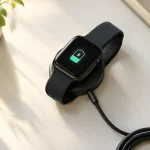
- Look for a charging indicator on the watch face — most models display a battery icon with a lightning bolt or a percentage counter.
- If the watch does not respond, reposition the charger and check that the cable is firmly seated at both ends.
Monitor the Charging Progress
A typical smart watch charges from 0 to 100% in about 1.5 to 2.5 hours, depending on battery capacity and charger output. When you charge a smart watch, avoid using it heavily while it is plugged in — running GPS, heart-rate monitoring, or bright-screen apps during charging generates extra heat, which stresses the battery. One of the key safety tips is to let the watch charge in peace.
Proper Methods to Extend Battery Life
Understanding how to charge smart watch devices is only half the equation. The way you charge has a direct impact on how long the battery lasts — not just today, but over months and years. Smart watches use small lithium-ion cells that degrade faster than the larger cells found in smartphones. According to Battery University, small wearable batteries are typically rated for around 300 charge cycles before significant capacity loss, compared to 800+ cycles for modern smartphones. These proper methods will help you get the most out of every cycle.
Follow the 20–80% Charging Rule
Lithium-ion batteries experience the most chemical stress at the extremes — below 20% and above 80%. When you charge a smart watch, keeping the battery within this middle range as often as possible reduces wear on each cycle. You do not need to charge to 100% every time; a quick top-up from 30% to 80% during your morning routine is gentler on the cell than a full 0-to-100% session.
Avoid Overnight and Extended Charging
While modern smart watches include overcharge protection circuits, leaving the watch on the charger for hours after it reaches 100% keeps the battery in a high-voltage state that accelerates long-term degradation. Charge during the day when you can monitor it, and unplug once the battery reaches full capacity. If you must charge overnight, consider using a smart plug with a timer to cut power after two hours. This is one of the most effective safety tips for preserving battery health.
Mind the Temperature
Heat is the number one enemy of lithium-ion batteries. Charging a smart watch in direct sunlight, on a car dashboard, or under a pillow traps heat and can permanently reduce capacity. The ideal charging temperature is between 0°C and 35°C (32°F–95°F). If your watch feels unusually warm during charging, disconnect it immediately and let it cool before resuming.
Safety Tips for Charging Your Smart Watch
Beyond battery longevity, proper charging practices protect you from physical hazards. The U.S. Consumer Product Safety Commission (CPSC) has flagged lithium-ion batteries as a growing fire risk in consumer electronics, noting that incompatible chargers and overheating are leading causes of incidents. These safety tips will help you avoid those risks every time you charge a smart watch.
Use the Original or Certified Charger
Third-party chargers that do not meet your watch’s voltage and current specifications can deliver inconsistent power, leading to overheating, slow charging, or permanent battery damage. When you learn how to charge smart watch devices safely, the first rule is: always use the cable and adapter provided by the manufacturer, or purchase a replacement that is explicitly certified for your model. Avoid cheap, unbranded cables sold at gas stations or discount stores — they often lack proper voltage regulation.
Recognize Warning Signs of Battery Damage
Stop charging immediately and contact the manufacturer if you notice any of the following safety tips red flags:
- The watch case feels hot to the touch (not just warm, but uncomfortably hot)
- Visible swelling or bulging of the watch case or screen
- A burning smell or unusual hissing sound from the watch
- The battery drains abnormally fast or the watch shuts off unexpectedly
These symptoms can indicate a failing cell that poses a fire or burn hazard. Do not attempt to charge a damaged watch — disconnect it and follow local hazardous waste disposal guidelines.
Choose a Safe Charging Environment
Charge your watch on a hard, non-flammable surface — a desk, nightstand, or countertop. Never charge it under a pillow, blanket, or inside a bag where heat cannot dissipate. Keep the watch away from water sources (sinks, bathtubs) unless it is specifically rated for water exposure, and even then, dry the charging contacts thoroughly before connecting.
Building Daily Habits for a Healthy Battery
Small daily habits compound into significant battery savings over the life of your watch. Here is how to build a routine that keeps your battery performing well for as long as possible and helps you maintain a healthy battery throughout the device’s entire lifespan. These habits are the foundation of proper methods for long-term smart watch care. Anyone who wants to know how to charge smart watch devices the right way should start with these fundamentals.
Establish a Consistent Charging Routine
Rather than waiting for the battery to die, charge your watch at a predictable time each day — for example, during your morning shower or at your desk during lunch. Short, frequent top-ups between 20% and 80% are less stressful than infrequent deep charges. Many modern smart watches include a battery health setting that limits the maximum charge to 80% automatically; enable this feature if available to maintain a healthy battery over time.
Long-Term Storage Guidelines
If you plan to store a smart watch for weeks or months without use, charge it to approximately 50% before powering it off. Storing a lithium-ion battery at 0% can cause it to fall below the minimum voltage threshold, rendering it unrecoverable. Storing at 100% accelerates capacity loss. Check the stored watch every 3–6 months and top it back up to 50% if it has dropped. This is one of the most overlooked safety tips for wearable devices.
| Practice | Benefit | What to Avoid |
|---|---|---|
| Charge between 20–80% | Reduces chemical stress per cycle | Regular 0–100% full charges |
| Use the original charger | Ensures correct voltage and current | Unbranded or mismatched cables |
| Charge at room temperature | Prevents heat-related degradation | Charging in direct sunlight or enclosed spaces |
| Unplug at 100% | Avoids prolonged high-voltage state | Leaving on charger overnight regularly |
| Store at ~50% if unused | Prevents deep discharge damage | Storing at 0% or 100% for extended periods |
Data on lithium-ion cycle life referenced from Battery University, BU-808.
Choosing a smart watch with well-designed charging hardware and battery management software makes all of these best practices easier to follow. For businesses sourcing wearable devices, OEM/ODM partners like WorldWell Tech offer customizable smart watch platforms with built-in battery optimization features, helping brands deliver products that make it easy for users to charge a smart watch the right way. Whether you are a consumer learning how to charge smart watch units at home or a brand evaluating OEM sourcing options, these principles apply universally.
FAQ
How long does it take to charge a smart watch?
Most smart watches charge from 0 to 100% in approximately 1.5 to 2.5 hours. Some models with fast-charging support can reach 80% in under 30 minutes. Always refer to your manufacturer’s specifications for exact charging times.
Can I charge my smart watch with a phone charger?
You can use a phone charger’s USB port as a power source, but ensure the output voltage matches your watch’s requirements (typically 5V/1A). High-wattage fast chargers (e.g., 65W laptop chargers) may deliver more current than the watch can handle — use a low-power port or a dedicated 5V adapter instead.
Is it bad to charge my smart watch every day?
No — daily charging is normal for most smart watches, which have smaller batteries that require frequent top-ups. The key is to avoid draining to 0% before each charge. Short daily sessions between 20% and 80% are actually better for maintaining a healthy battery than waiting for a full discharge.
Should I turn off my smart watch while charging?
It is not strictly necessary, but powering off or enabling sleep mode during charging reduces heat generation and allows the battery to charge more efficiently. If you notice the watch getting warm, turning it off is a good safety tip to follow.
Why is my smart watch charging slowly?
Slow charging can be caused by a degraded or dirty charging cable, a low-power USB port (e.g., a computer USB 2.0 port), a software issue, or a battery that has reached the end of its cycle life. Try a different cable and power adapter, clean the contact points, and check for firmware updates.
How do I know if my smart watch battery needs replacement?
If your watch no longer holds a charge for more than a few hours despite being in good condition, the battery has likely degraded beyond useful life. Most smart watch batteries are not user-replaceable — contact the manufacturer or an authorized service center for a battery replacement.