
What Is a Smart Ring and How Does It Work?
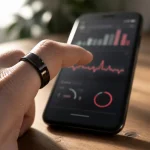
A smart ring is a compact wearable smart ring that sits on your finger and uses built-in sensors to monitor health metrics around the clock. Unlike a smartwatch, it has no screen to distract you — instead, it quietly collects data on heart rate, sleep quality, body temperature, blood oxygen levels, and daily activity, then syncs everything to a companion app on your smartphone.
Inside the ring’s slim housing, you’ll find several key components:
- Photoplethysmography (PPG) sensors — measure blood flow to calculate heart rate and heart rate variability (HRV)
- Accelerometers — track movement, step count, and sleep stages
- Temperature sensors — detect subtle body temperature shifts linked to recovery, illness, or menstrual cycles
- SpO₂ sensors — estimate blood oxygen saturation during sleep
The concept is simple: wear the ring 24/7, let it collect passive biometric data, and review insights in the app. A 2025 systematic review published in the National Center for Biotechnology Information found that smart rings demonstrated high accuracy for heart rate (r² = 0.996) and sleep detection (93–96% sensitivity) when compared to medical-grade devices.
The global smart ring market was valued at approximately USD 697.6 million in 2025 and is projected to reach USD 7.8 billion by 2035, growing at a 25.4% CAGR, according to Global Market Insights. This rapid growth reflects how smart ring wearable technology has moved from niche gadget to mainstream health tool.
Step-by-Step: How to Use a Smart Ring for the First Time
Choosing the Right Size
Getting the correct fit is critical — not just for comfort, but for data accuracy. Sensors need consistent skin contact to read reliable biometric signals. Most manufacturers recommend the index, middle, or ring finger, with the sensor side facing the palm.
Here’s how to find your size:
- Request a sizing kit — most brands ship plastic sizers before your actual ring arrives
- Try multiple fingers — test on both hands; finger sizes differ
- Wear the sizer for at least 24 hours — fingers swell in heat, shrink in cold
- Make a fist — if you see a gap between the ring and your finger, try a smaller size
- Check sensor contact — the inner sensors should sit flush against your finger’s pad
One in four smart rings are returned due to fit issues, so take this step seriously before learning how to use smart ring devices effectively.
Charging Your Smart Ring
Before pairing, charge your ring fully. Most smart rings use a magnetic charging dock or a dedicated charging case. A full charge typically takes 60–80 minutes and provides:
| Battery Performance | Typical Range |
|---|---|
| Standard use (24/7 wear) | 4–7 days |
| Moderate use (sleep + activity) | 5–10 days |
| Power-saving mode | Up to 12 days |
Data compiled from manufacturer specifications across leading smart ring brands (2024–2025).
Keep the charging habit consistent — many users charge during a morning shower or while at their desk. Some newer models even include a charging case that extends total battery life to two weeks or more.
Downloading the Companion App and Pairing
Every smart ring relies on a companion app for data visualization and settings. The setup process is straightforward:
- Download the app — search your ring brand’s app in the App Store or Google Play
- Create an account — register with your email or sign in with an existing account
- Enable Bluetooth — make sure your phone’s Bluetooth is on
- Pair the ring — the app will search for nearby devices; follow the on-screen prompts
- Grant permissions — allow notifications, health data access, and background sync
Modern smart rings use Bluetooth 5.0 or later for fast, low-energy syncing. The entire process usually takes under five minutes.
Setting Up Your Profile and Health Goals
Once paired, the app will ask for basic information:
- Age, gender, height, and weight
- Primary goals (better sleep, fitness tracking, stress management)
- Notification preferences
- Wake-up and bed-time windows
These inputs help the app calibrate its algorithms to your body. The more accurate your profile, the more relevant your insights will be.
Key Features of a Smart Ring Wearable
Heart Rate and SpO₂ Monitoring
Your smart ring fitness tracker continuously monitors your heart rate using PPG sensors. Unlike a smartwatch that samples periodically during workouts, a smart ring captures resting heart rate and HRV around the clock — giving you a clearer picture of cardiovascular health.
SpO₂ (blood oxygen) readings are typically taken during sleep. A drop in overnight SpO₂ can signal breathing disruptions, making this feature valuable for identifying potential sleep apnea patterns.
Sleep Tracking
Sleep tracking is where smart rings truly excel. Because the ring shifts less than a wristwatch during the night, it delivers cleaner data. Most devices break sleep into:
- Light sleep — recovery and memory consolidation
- Deep sleep — physical restoration and immune support
- REM sleep — cognitive recovery and dreaming
- Total sleep time and sleep latency
The PMC systematic review found that smart ring sleep staging algorithms achieve 91.7–91.8% accuracy against polysomnography gold standards — approaching the 83% inter-rater agreement among human sleep technicians.
Activity and Fitness Tracking
While smart rings aren’t designed to replace a GPS sports watch, they handle daily activity tracking well:
- Step count and distance estimation
- Calorie expenditure estimates
- Active minutes throughout the day
- Automatic workout detection (walking, running, cycling)
For most users, a smart ring fitness tracker provides enough activity data to stay accountable without the bulk of a wristwatch. It’s particularly useful for people who find wearing a watch uncomfortable during certain activities or while sleeping.
Stress and Recovery Insights
Many smart ring wearable devices combine HRV, resting heart rate, sleep quality, and body temperature into a composite “readiness” or “recovery” score. This single number helps you decide whether to push hard in training or take a rest day. Over time, you’ll learn which habits improve your score — and which drag it down.
Smart Ring vs. Smartwatch: Which Should You Choose?
| Feature | Smart Ring | Smartwatch |
|---|---|---|
| Comfort for 24/7 wear | Excellent — lightweight, no screen | Good — but bulkier on the wrist |
| Sleep tracking | Superior — less motion interference | Good — can be uncomfortable at night |
| Battery life | 4–10 days | 1–3 days (typical) |
| Display | None (data in app) | Full touchscreen |
| GPS | Rarely included | Built-in on most models |
| Real-time workout feedback | Limited | Detailed, on-wrist |
| Heart rate accuracy (resting) | Very high — finger PPG | Good — wrist PPG |
| Notifications | Minimal (vibration only) | Full app notifications |
| Water resistance | Typically 5 ATM | Varies (3–10 ATM) |
| Ideal user | Health-focused, sleep-first | Fitness-first, notification-heavy |
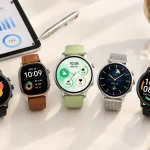
If your priority is passive, all-day health monitoring with minimal distraction, a smart ring is the better choice. If you need GPS, on-wrist workout metrics, and app notifications, a smartwatch still wins. Many users wear both — a smartwatch during workouts and a smart ring for everything else.
Tips to Get the Most Out of Your Smart Ring Fitness Tracker
- Wear it consistently — the data is only valuable if you wear the ring 24/7. Remove it only for charging.
- Position sensors correctly — the sensor bump should face the palm side of your finger for optimal contact.
- Keep firmware updated — manufacturers release algorithm improvements that enhance accuracy.
- Sync daily — open the app each morning to ensure data transfers and you see your latest scores.
- Set a sleep window — telling the app your typical bed and wake times improves sleep staging accuracy.
- Track trends, not single days — one bad sleep score doesn’t matter; a declining weekly trend does.
- Clean the ring regularly — sweat, lotion, and dirt can interfere with sensor readings. Wipe the inner surface with a soft cloth weekly.
Common Mistakes Beginners Should Avoid
Even after learning how to use a smart ring, new users often make these errors:
- Skipping the sizing step — ordering without testing your size leads to poor sensor contact and inaccurate data.
- Wearing it on the wrong finger — the index and middle fingers typically provide the strongest signal.
- Ignoring firmware updates — outdated software means missed accuracy improvements.
- Expecting medical-grade diagnosis — a smart ring is a wellness tool, not a medical device. Use its insights as conversation starters with your doctor, not as diagnoses.
- Removing it at night — sleep data is one of the ring’s strongest features. Wearing it overnight is essential for meaningful insights.
- Comparing scores with others — readiness and sleep scores are personalized. Your “70” might be excellent for your body.
- Not wearing it long enough — most algorithms need 3–7 days of baseline data before scores become reliable.
Conclusion
Learning how to use a smart ring is straightforward — charge it, size it correctly, pair it with the app, and wear it consistently. The real value comes over weeks and months as you build a baseline and start noticing trends in your sleep, recovery, and overall health.
Whether you choose a premium brand or explore OEM/ODM options from established manufacturers, the key is finding a device that fits well, tracks reliably, and integrates into your daily routine without friction. For teams evaluating smart ring options for product development or bulk sourcing, exploring a trusted smart ring supplier’s catalog can help identify the right balance of features, materials, and price points for your market.